
Storage and prerequisites
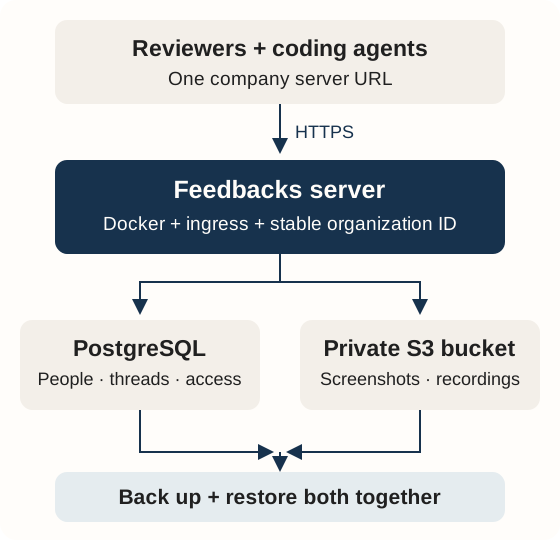
Prepare these once for your company. Reviewers only need the server URL and access to a project.
- Gather
- Create the bucket
- Configure
- Verify
Gather five things
| You need | How to get it | Where it goes |
|---|---|---|
| A server with Docker and Compose | Your company VM or cloud server, with persistent disk and outbound HTTPS | Runs the app and, with the supplied Compose file, PostgreSQL |
| A domain and HTTPS | Create a DNS record pointing to your ingress; obtain a trusted TLS certificate through your proxy or Dokploy | APP_ORIGIN, for example https://feedback.example.com |
| PostgreSQL | The supplied Compose file creates PostgreSQL 17 and a persistent volume; an independently managed PostgreSQL service is also possible | Compose uses POSTGRES_PASSWORD; an external database uses DATABASE_URL with its actual host, credentials and required TLS settings |
| A private S3-compatible bucket | Create a bucket in your own AWS S3, Wasabi or compatible storage account | S3_ENDPOINT, S3_REGION, S3_BUCKET |
| A dedicated storage credential | Create an application user/key with the installation-scoped policy below | S3_ACCESS_KEY_ID, S3_SECRET_ACCESS_KEY in private deployment secrets |
The supplied Compose file runs its own PostgreSQL service. To use a managed database, adapt the app's database URL and remove its local database dependency; do not paste an external URL into an unchanged Compose file expecting it to override the built-in URL.
Docker includes the application runtime and video tools. You do not need Node.js or FFmpeg on the production host when running the image. For a source checkout/build, Git and access to the source repository are also needed. Start with one app replica and size the server from measured usage; recordings, PDF processing and concurrent previews consume more memory than plain text reviews.
Create your private bucket
- Sign in to your own storage provider as an operator. Choose the region near your server and create a dedicated bucket, such as
company-feedbacks-media. - Keep public access disabled. In AWS S3, enable all Block Public Access settings and use Bucket owner enforced object ownership. Configure provider-side encryption. Do not enable public website hosting.
- Decide the recovery policy before accepting real reviews: versioning, retention and independent backups. Storage retention or Object Lock can prevent deletion; understand the provider's behavior before enabling it.
- Generate the installation's organization UUID once. Keep it with the backup configuration. The app uses it in object keys; changing it during a restore breaks that installation's identity.
- Create a dedicated application user/key. Attach the object policy below, replacing the bucket name and organization UUID. Save the secret directly in your deployment secret editor.
Use a separate operator credential for bucket creation and backup administration. The app does not create buckets or need full storage administrator access. Review your provider's billing, minimum retention, request and transfer charges in its current documentation.
Application policy
For AWS S3, this identity policy grants the operations used by the storage adapter. Wasabi supports S3-style policies; validate the policy and actual operations with your provider.
{
  "Version": "2012-10-17",
  "Statement": [
    {
      "Sid": "FeedbacksInstallationObjects",
      "Effect": "Allow",
      "Action": ["s3:GetObject", "s3:PutObject", "s3:DeleteObject"],
      "Resource": "arn:aws:s3:::YOUR_BUCKET/feedbacks/production/organizations/YOUR_ORGANIZATION_UUID/*"
    }
  ]
}
This does not grant bucket listing, administration, ACL changes or historical-version deletion. DeleteObject supports thread deletion and failed-upload cleanup. For a versioned bucket, deletion may leave prior versions or a delete marker; manage retention and recovery separately. If you choose customer-managed KMS encryption in AWS, configure the corresponding key policy and required KMS permissions as well.
The prefix also contains private keys used to encrypt managed GitHub App credentials. Keep the entire installation prefix private and include it in recovery. See managed integration storage.
Wasabi: lower storage cost for retained evidence
Wasabi is a recommended S3-compatible option for a growing archive of screenshots and recordings. Its advertised capacity rate is lower than R2 Standard and the common US East AWS S3 Standard rate. Compare the complete bill before choosing a provider.
| Provider | Published storage rate, checked 2026-10-01 | Cost details |
|---|---|---|
| Wasabi Hot Cloud Storage | Starts at $7.99/TB-month; approximately $0.0078/GB-month | Pay-as-you-go has a 1 TB account minimum and 90-day minimum storage duration. Early deletion/overwrite can still be billed. No separate API/egress fees within its usage policies; repeated monthly downloads exceeding stored capacity are outside its free-egress guideline. |
| Cloudflare R2 Standard | $0.015/GB-month | 10 GB-month free storage; request charges beyond the free allowance; free direct egress; no Standard minimum storage duration. |
| AWS S3 | Depends on region and storage class | Storage, requests, retrieval and transfer are separate cost components. Use the calculator for your region. |
Wasabi can reduce storage cost for evidence retained at scale. R2 can cost less for a small installation within its free allowance or a workload with frequent deletion and heavy downloads. Select storage for your actual retention and access pattern; Feedbacks has no required storage vendor.
Create a Wasabi bucket with the CLI
These examples use generic names. Run them from an operator machine with AWS CLI v2 and a valid Wasabi bucket/IAM administrator credential supplied by your secret manager in AWS_ACCESS_KEY_ID and AWS_SECRET_ACCESS_KEY. Keep this operator credential separate from the app key. Choose an unused bucket name and the region for your deployment.
WASABI_BUCKET=example-feedbacks-assets
WASABI_REGION=eu-central-2
WASABI_ENDPOINT=https://s3.eu-central-2.wasabisys.com

aws --endpoint-url "$WASABI_ENDPOINT" --region "$WASABI_REGION" \
  s3api create-bucket --bucket "$WASABI_BUCKET" \
  --create-bucket-configuration "LocationConstraint=$WASABI_REGION"

aws --endpoint-url "$WASABI_ENDPOINT" --region "$WASABI_REGION" \
  s3api get-bucket-location --bucket "$WASABI_BUCKET"

aws --endpoint-url "$WASABI_ENDPOINT" --region "$WASABI_REGION" \
  s3api get-bucket-acl --bucket "$WASABI_BUCKET"
Check the returned region and keep the ACL private: no public Group grants. For this basic app bucket, the commands leave versioning/Object Lock disabled. Choose an intentional backup/retention policy before storing real reviews. Wasabi encrypts stored data at rest by default; the tested service returned MethodNotAllowed for PutBucketEncryption. Do not copy AWS Block Public Access or bucket-encryption API commands into the Wasabi setup. Wasabi security, CLI instructions.
Save this as wasabi-https-only.json, replacing YOUR_BUCKET. It denies unencrypted transport and grants no public access:
{
  "Version": "2012-10-17",
  "Statement": [
    {
      "Sid": "EnforceHTTPS",
      "Effect": "Deny",
      "Principal": "*",
      "Action": "s3:*",
      "Resource": ["arn:aws:s3:::YOUR_BUCKET", "arn:aws:s3:::YOUR_BUCKET/*"],
      "Condition": { "Bool": { "aws:SecureTransport": "false" } }
    }
  ]
}aws --endpoint-url "$WASABI_ENDPOINT" --region "$WASABI_REGION" \
s3api put-bucket-policy --bucket "$WASABI_BUCKET" \
--policy file://wasabi-https-only.json
aws --endpoint-url "$WASABI_ENDPOINT" --region "$WASABI_REGION" \
s3api get-bucket-policy --bucket "$WASABI_BUCKET"This is for a new dedicated bucket. Inspect and preserve an existing bucket's policy rather than overwriting it with this example. Wasabi HTTPS resource policy.
Create the application's scoped key
Generate the stable organization UUID first. Save the application policy above as feedbacks-storage-policy.json, substituting your bucket and UUID. Wasabi IAM uses https://iam.wasabisys.com with signing region us-east-1, independently of the bucket's S3 region. A full-S3-only operator key cannot create IAM identities.
WASABI_APP_USER=example-feedbacks-app

aws --endpoint-url https://iam.wasabisys.com --region us-east-1 \
  iam create-user --user-name "$WASABI_APP_USER"

aws --endpoint-url https://iam.wasabisys.com --region us-east-1 \
  iam put-user-policy --user-name "$WASABI_APP_USER" \
  --policy-name FeedbacksInstallationObjects \
  --policy-document file://feedbacks-storage-policy.json

# This output contains the one-time secret. Run in a private custody directory.
(
  umask 077
  set -C # Refuse to overwrite an existing credential file.
  aws --endpoint-url https://iam.wasabisys.com --region us-east-1 \
    iam create-access-key --user-name "$WASABI_APP_USER" \
> feedbacks-app-credential.json
)
chmod 600 feedbacks-app-credential.json

aws --endpoint-url https://iam.wasabisys.com --region us-east-1 \
  iam get-user-policy --user-name "$WASABI_APP_USER" \
  --policy-name FeedbacksInstallationObjects

aws --endpoint-url https://iam.wasabisys.com --region us-east-1 \
  iam list-access-keys --user-name "$WASABI_APP_USER"
Do not reuse an existing IAM name or create extra keys on retries. Verify exactly one Active key and the exact installation prefix. No console login, group, IAM administration, bucket deletion, ACL mutation or historical-version deletion is needed. Store the one-time credential in your vault; set its two key values in private deployment secrets. Remove the operator credential from the app's environment. Never print the credential JSON or include it in a public issue.
Prove storage with a disposable object
Switch the CLI to the scoped application key using your secret manager. Set FEEDBACKS_ORGANIZATION_ID to the same UUID configured in the app. The upload uses CRC32 for current Wasabi/AWS CLI compatibility. These commands use only one synthetic object in the installation prefix:
PROBE_KEY="feedbacks/production/organizations/$FEEDBACKS_ORGANIZATION_ID/acceptance/storage-probe.txt"
printf 'Feedbacks synthetic storage check.\n' > storage-probe.txt

aws --endpoint-url "$WASABI_ENDPOINT" --region "$WASABI_REGION" \
  s3api put-object --bucket "$WASABI_BUCKET" --key "$PROBE_KEY" \
  --body storage-probe.txt --checksum-algorithm CRC32

aws --endpoint-url "$WASABI_ENDPOINT" --region "$WASABI_REGION" \
  s3api get-object --bucket "$WASABI_BUCKET" --key "$PROBE_KEY" \
  storage-readback.txt
cmp storage-probe.txt storage-readback.txt

# No anonymous read of private media should succeed.
curl -s -o /dev/null -w '%{http_code}\n' \
  "$WASABI_ENDPOINT/$WASABI_BUCKET/$PROBE_KEY"

# The scoped key must reject access outside its installation prefix.
aws --endpoint-url "$WASABI_ENDPOINT" --region "$WASABI_REGION" \
  s3api head-object --bucket "$WASABI_BUCKET" \
  --key outside-installation/not-present.txt

# Clean up only this disposable probe after verifying the allowed delete path.
aws --endpoint-url "$WASABI_ENDPOINT" --region "$WASABI_REGION" \
  s3api delete-object --bucket "$WASABI_BUCKET" --key "$PROBE_KEY"

aws --endpoint-url "$WASABI_ENDPOINT" --region "$WASABI_REGION" \
  s3api head-object --bucket "$WASABI_BUCKET" --key "$PROBE_KEY"
Expected results: matching readback; anonymous GET and out-of-prefix HEAD denied with 403; after cleanup, the scoped HEAD returns 404. The underlying bucket/IAM, upload, readback, denial and cleanup operations were exercised on an isolated private Wasabi bucket on 2026-10-01. Examples contain no installation identifiers or credentials. CLI success is separate from the Feedbacks upload/restart/restore checks below.
Paste the right values
| Deployment field | Source or value |
|---|---|
NODE_ENV | production (the supplied production Compose file sets this) |
APP_ORIGIN | Your exact HTTPS app origin; no trailing slash |
ORGANIZATION_ID | Your unique, stable organization UUID |
POSTGRES_PASSWORD | A strong generated password for the supplied PostgreSQL service; hexadecimal avoids database URL escaping problems |
ASSET_DRIVER | s3 (the supplied production Compose file sets this) |
S3_BUCKET | The exact bucket name, without a URL or folder suffix |
S3_REGION | The bucket's signing region |
S3_ENDPOINT | That region's HTTPS S3 API service endpoint, not the provider dashboard, bucket website or CDN URL |
S3_ACCESS_KEY_ID | The dedicated application's access key ID |
S3_SECRET_ACCESS_KEY | Its secret key; never place it in the image, Git or browser |
TRUST_PROXY_HOPS | The actual trusted ingress hop count; usually 1 for one proxy. Restrict the app port to that ingress |
Example regional pair: an AWS S3 bucket in eu-west-1 uses https://s3.eu-west-1.amazonaws.com and eu-west-1. A Wasabi bucket in eu-central-1 uses https://s3.eu-central-1.wasabisys.com and eu-central-1. Use the endpoint for your bucket's region. Feedbacks sends path-style S3 requests over HTTPS; the runtime must trust the endpoint certificate.
Generate values locally, then paste them into private deployment secrets:
# Run independently; save the outputs privately.
openssl rand -hex 32
node -e 'console.log(crypto.randomUUID())'
Node is only needed for this example UUID command; your deployment platform or another trusted UUID generator can supply the same value. If using a local .env, set its permissions to 0600 and keep it outside source control. Optional Turnstile and GitHub integration keys are described in the production reference.
Verify before handing over
- Deploy through the server guide, bootstrap the owner, sign in and create a test project.
- Upload a test screenshot and a short recording. Reopen both through Feedbacks using an authorized account.
- Confirm an unrelated project member cannot fetch the attachment. A private bucket does not replace the application's project authorization.
- Restart only the app and reopen the same evidence. Preserve the PostgreSQL volume and bucket.
- Delete a disposable test thread and inspect its cleanup receipt. Investigate pending/failed cleanup rather than assuming storage deletion succeeded.
- Restore a database backup and matching object storage into a separate environment. Preserve the original organization UUID and production storage prefix. Verify sign-in and evidence there.
/readyz verifies the database, not S3. A green deployment status does not prove uploads or recovery. Never run docker compose down -v against data you need.
If setup fails
| Symptom | Check |
|---|---|
| Access denied on upload/read | Application policy, correct access key, bucket name and installation prefix |
| Access denied on deletion | s3:DeleteObject, retention/Object Lock and provider deletion rules |
| Signature or region error | Bucket region, matching service endpoint, server clock and credential pair |
| TLS/certificate error | HTTPS endpoint and trusted certificate chain; do not disable certificate verification |
| App ready but media fails | Test S3 separately; readiness only checks PostgreSQL |
| Evidence missing after restore | Restore database and objects together; keep organization UUID, prefix and production mode |
Provider references
Checked 2026-10-01. These are provider instructions, not a certification of every compatible service.
- AWS S3 public access controls
- AWS S3 policy resources and prefixes
- AWS S3 deletion and version behavior
- Wasabi application users and access keys
- Wasabi regional service endpoints
Continue with deployment and backup and restore.