
Replay the moment. Inspect the evidence.
Record the problem, then jump to the click, request or error that matters.
- Record video + session
- Stop & review
- Send video
Capture a session
- Open the connected extension and choose Record video + session, or Session only in the source page’s recording options.
- Reproduce the problem. Pause/resume with the on-page controls; right-click to add screenshot comments.
- Choose Stop & review, inspect the recording and captured events, then send.
Capture starts explicitly and lasts up to five minutes within bounded local storage. Check tab sound and microphone settings before recording. Add exact redirect origins under Capture across redirect sites before a cross-site flow; unapproved origins leave an explained gap.
Read the timeline
| Need | Inspect |
|---|---|
| What the reviewer saw | Video or unedited DOM replay |
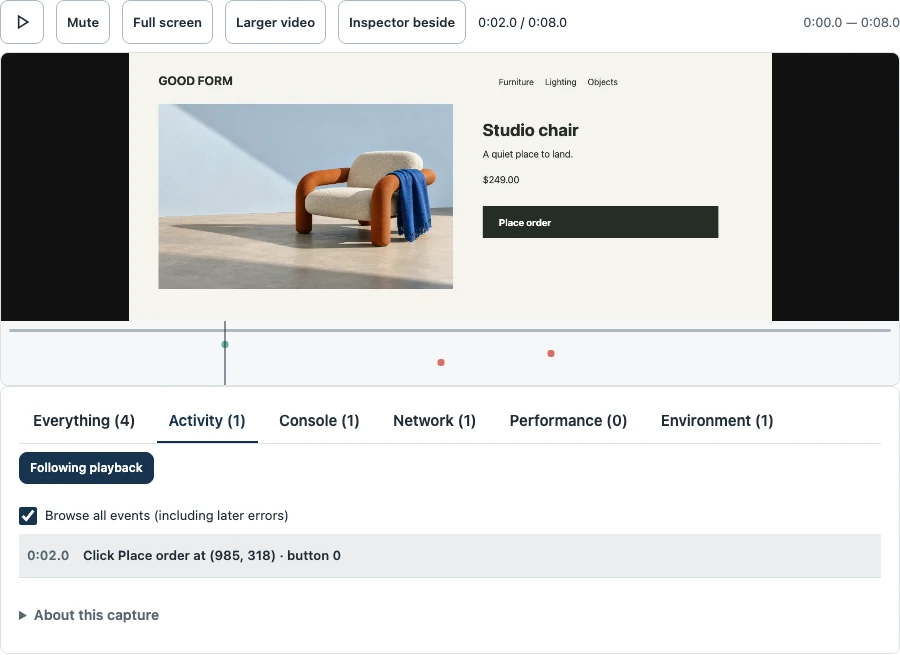
| Which action failed | Everything, Activity, Console or Network |
| Slow loading or missing evidence | Performance, environment and channel coverage |
Select an event or marker to seek. Larger expands the video; Beside moves the inspector alongside it on wide screens. Empty channels do not prove nothing happened.
Save frame keeps a screenshot. In the thread, Annotate frame adds a timestamped point and drawing marks.
Choose what you share
Check text/input masking and optional network bodies before recording. Recognized credentials are masked in session evidence; DOM masking does not mask video pixels. Preview the whole clip.
Trim/crop before sending. Trimming excludes diagnostics outside retained intervals; edited clips omit DOM replay. Inaccessible frames or external assets can limit replay fidelity.
Debugging bundles · Recording limits and exact behavior · Access and privacy