
Connect your agent. Pick a fix.
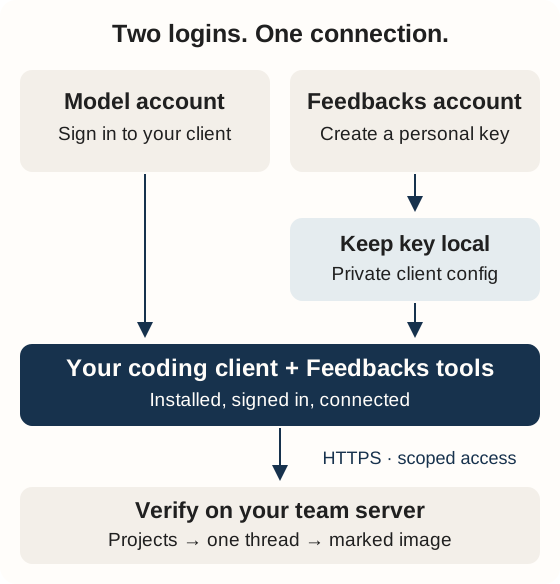
Sign in to your team's Feedbacks server as yourself. Each developer connects their own agent with their own key.
- Copy prompt
- Keep key local
- Verify access
- Choose a task
Connect in Setup
Browser sign-in for HTTP clients
If your team enabled OAuth, add your server's /mcp URL in the client, sign in and choose projects. Read access is required; replies are optional. Revoke in Account → Connections. Follow the illustrated OAuth setup for commands and recovery. Local plugins and keys remain available.
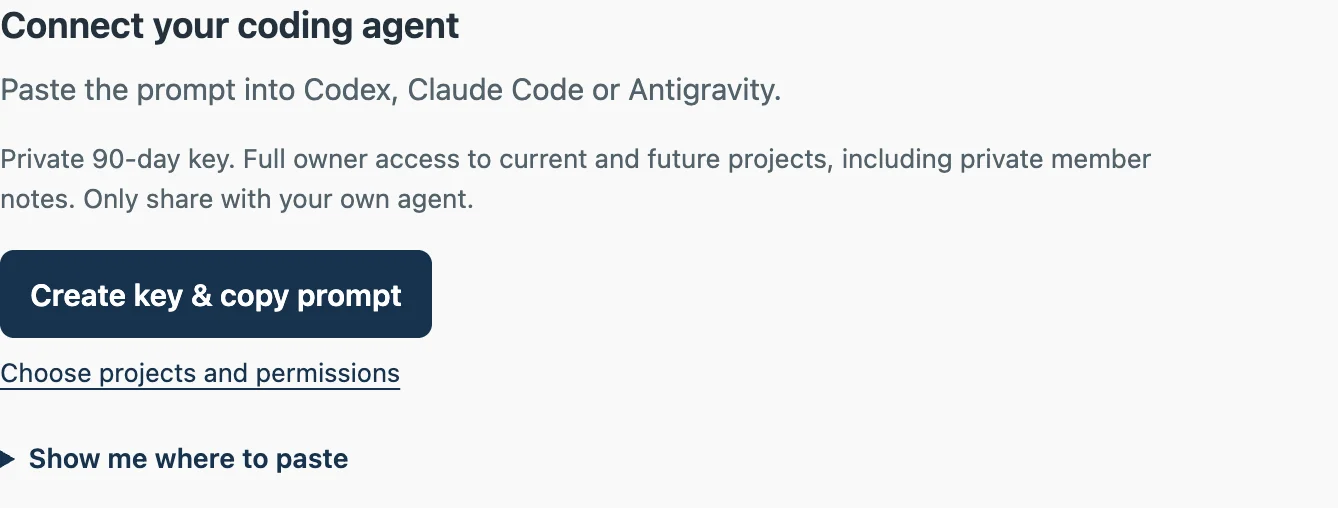
- Under Keep key local, choose Create & copy prompt. Check the displayed permissions.
- Paste the key-free prompt into Codex, Claude Code or Antigravity. Let the agent prepare the local command for your client and OS.
- Return to Copy key, then run that command locally. Keep the key out of chat and Git.
- Reconnect the client. Verify tool discovery and permitted project reads.
An owner's default key has full administration access. Choose Advanced permissions for narrower access. Easy Setup includes recording and diagnostic reads for permitted projects; existing keys keep their original scopes.
Quick setup copies prompt and key together. Pasting shares the key with the chat provider and anyone with conversation access. Disabling training does not guarantee no storage or access. Both paths may leave the key in clipboard history/sync; a local agent can still read its private configuration.
Ask your agent to verify setup
After following the Setup prompt, paste this key-free check:
Verify this Feedbacks connection in the actual running client.
Check MCP tool discovery and the two installed Feedbacks skills.
List permitted projects. Ask me to choose if the project is ambiguous.
Show one bounded thread preview and read its marked image when allowed.
Report each check as passed, blocked or unavailable with the exact recovery.
Preserve existing client configuration. Keep credentials out of output.
Do not change feedback, source code or external systems during verification.
Start one agreed task
Open a thread → Copy task for agent → paste with your request. The agent checks fresh evidence, proposes the change and verifies agreed work. A broad backlog request offers assigned tasks for you to choose. Connection alone starts no fixes or external writes.
| Need | Reference |
|---|---|
| Client settings, stdio or remote setup | Connection and local import |
| Reusable skills and discovery | Client installation |
| Scopes, limits and exact operations | MCP contract |
| Evidence, assignments and planning | Agent workflow |
Native plugins
Install Node.js 22.12+ or 24 and Git on the client machine. Install and sign in to your chosen CLI using the Claude Code quickstart or Codex CLI guide. Check claude --version or codex --version before installing the plugin. A desktop app login alone does not verify that the terminal command is installed or authenticated.
These commands use the public Feedbacks marketplace; no server checkout or npm ci is needed.
Claude Code
claude plugin marketplace add Softinator-TechLabs/feedbacks-plugins
claude plugin install feedbacks@feedbacks
Codex
codex plugin marketplace add Softinator-TechLabs/feedbacks-plugins
codex plugin add feedbacks@feedbacks
Continue with your personal URL/key configuration above, restart the client and verify the plugin inventory. Both packages include review-feedback, manage-feedbacks-context and the bundled MCP adapter. The install commands were verified with Claude Code 2.1.286 and Codex CLI 0.159.3. The publisher's own marketplace is separate from reviewed official directories.
Something stuck? Match the symptom.
| Symptom | Next action |
|---|---|
claude or codex: command not found | Finish the linked CLI installation and PATH setup. Open a new terminal; check its version. |
| Claude OAuth expired | Run claude auth login locally. The Feedbacks key does not refresh the model login. |
| Plugin installed, tools absent | Reconnect or restart the actual client, then check its MCP inventory in a fresh chat. |
UNAUTHENTICATED from Feedbacks | Check the configured server URL and the key's expiry/revocation in Account. Import a replacement locally when needed. |
FORBIDDEN or missing recording/image scope | Check both project membership and the key's selected projects/scopes. Create a replacement key with approved access; reconnect. |
| Clipboard unavailable in SSH, WSL or a cloud agent | Run the prepared import command in your local terminal; use hidden local input when clipboard access is unavailable. |
Keep passwords, login codes and session tokens out of chat. Use the local credential import reference for private configuration and clipboard recovery.
For source builds, standalone ZIPs and private configuration, use the native client reference.